Reading agent source code, you tend to get stuck in one of two places: either you are dragged along by the interaction details of the CLI layer, or you never move past the conclusion that “the LLM will call tools.” Putting three implementations side by side is actually clearer — which parts are irreducible and which are just a matter of style falls out of the comparison.
- CoreCoder: a minimal agent written by hand in Python. The loop, tool, and context layers are all written from scratch, so the skeleton is visible.
- Claude Code: the production implementation, with a full serialized source walkthrough on xuanyuancode. What is worth reading is the startup assembly, the long-lived session object, context engineering, and how tools like BashTool get “governed.”
- learn-claude-code: the teaching implementation. hook, task, multi-agent, memory, and MCP are broken into small pieces and covered one at a time.
What follows is organized by mechanism, not by project.
Agent Loop: the heart of the whole flow
CoreCoder holds up the entire flow with a single for loop, max_rounds = 50, and exactly one transition condition: does this round still have a tool call.
Tool calls follow OpenAI’s function calling paradigm: the assistant message carries a tool_call, each call has an id, and the execution result comes back into the history under that same id, paired as tool → tool_call_id → tool_content. That is all the skeleton amounts to; what actually causes trouble are two “unclean” moments inside the loop.
First, tool errors have to be attributable. The same error has to be split into two cases: it went wrong when the arguments were passed into the tool function, or it went wrong while the tool was executing. The former is the model’s fault (bad schema or arguments), the latter is the environment’s fault (command, path, permissions). Without separating them, the feedback you hand the model is wrong, and the next round is wrong again.
Second, the history has to be made legal again after an interrupt. When the user hits Ctrl+C, if it lands exactly in the gap where “the model has already emitted a tool_call but the tool has not finished executing,” the history now contains a tool_call with no result. To the model that is an illegal state, and it affects the whole session. CoreCoder’s move is to patch that gap with content: ["interrupt"] — restore the history to a legal state first, then rethrow the exception up to the caller.
This idea of “patching in one legal piece of content” shows up once more later on — during context compression.
The tool layer: definition, editing, and execution
Tool definitions are plain: subclass the Tool base class, hold name, description, and parameters, implement execute(), then let schema() assemble it into OpenAI function calling format and register it into tool_list.
Where the real work goes is the file-editing tool, because it is the hand the agent uses most. All three routes have been tried:
- Let the model rewrite the file wholesale — too many tokens wasted.
- Let the model locate by line number — the model is very fuzzy about line numbers, and line counts cannot drift.
- Let the model produce a unified diff (the kind with a
@@ -42,7 +42,8 @@header) — the error rate is maddening; it cannot get the context line counts and offsets right.
So CoreCoder took a fourth route: locate a uniquely identified edit. The snippet to be replaced must appear in the file exactly once; if it appears more than once, make it carry more context until it is unique; after the edit, the tool hands the diff of that change back to the model so the model can judge for itself whether it got it right.
Bash is a different discipline: every command passes through a detection table of dangerous commands like rm before it runs, and chained commands such as cd a && cd b have to be read in order, because b is relative to a.
Claude Code’s BashTool turns this into a system capability. The key is not that it “can execute commands” but that it builds command execution into a first-class capability with semantic classification, permission constraints, task management, and UI presentation:
- It provides the execution capability you need to verify code. Without BashTool, an Agent can only make static edits; with it, the agent can run tests (
pytest,cargo test), watch builds (npm run build), drive project scripts (lint, formatting), and connect to toolchains like Git and package managers to get the full project state. The distance between “understanding the code” and “verifying the code” is exactly this layer. - It tries to understand a command’s semantics instead of executing it as a black box. It distinguishes whether a command is a search, a read, or something else, rather than dumping everything into the shell. The payoff is threefold: UI presentation is more sensible (a different interface per command type), security policy is finer-grained (read-only commands can be auto-approved with more confidence), and result handling is better (search and read results can be collapsed).
- It has strict security controls. When a command comes in, it additionally cares about: whether it is a read-only operation, whether the operating path is legal, whether it should run inside a sandbox, whether it needs a user permission confirmation, and whether it is suitable for running in the background.
One more note: in the CLI, the agent’s actual output and the UI display are two different things. The display layer can truncate, collapse, and colorize — but that is the display layer’s business.
Context engineering: what to inject, what to cut
Context comes down to two things: what you put in and what you cut out.
Injection. Files like CLAUDE.md are the core — they are what you get after filtering and deduplicating repo information, project branches, memory information, and so on. They turn project experience from “something a person explains on the fly” into “injectable system knowledge,” which directly affects three things: output style is more consistent, edits match repo conventions more closely, and the same mistakes stop recurring. Alongside them, git status goes into context as well.
Compression. CoreCoder prepared three tiers of safety net, applying the next one when the previous is not enough:
- A
tool_call’s return value is only useful to the task at hand and there is little worth keeping in later tasks, so keep the head and tail, delete the middle. - Compress the history messages into a summary, but keep the structured content rather than turning them into a blob of background text.
- If the first two tiers are still not enough, keep only the first few rounds plus the summary and delete aggressively.
There is a trap here, from the same root as the interrupt problem at the start: if the split point happens to land on a tool_call, tool_id and its tool_content are cut apart, and the history is illegal again. So when deleting, you have to move the split boundary; you cannot cut straight through the middle.
Claude Code’s ordering is an extension of the same idea: keep structured context first, compress and trim the low-value content, and do not rush to turn it into a summary; if that is not enough, project a collapsed view of the context and let the model compress on its own; only then fall back to last-resort compression. A summary is not the first step, it is the last.
Session and state: why QueryEngine is needed
main.tsx is the application’s “assembly root”: it has to get everything ready before the REPL comes up.
- Use profile checkpoints to measure initialization time per stage and fight for startup time (loading config, the API).
- Pull context, command, skill, and tool, initialize external capabilities (MCP, LSP), and pin down the current session’s state: whether it is interactive mode, whether there is a remote session or bridge mode, whether an old session should be restored, and what the model / permissions / prompt style / working directory are.
- All of this is done before the REPL starts — by the time the user sees the interface, everything that can be used is already in place.
QueryEngine is an object that lives for the duration of a session, and that is why it can span many rounds. The state it holds for the long term is exactly the set of things that “remain after a session ends”:
- message history
- known permission denials
- file read cache
- usage statistics
- discovery state for certain memory / skill
submitMessage() is essentially “start one agent run”: receive user input → set directory and session → filter tools → configure prompt and context → open a query to interact with the model → tool call output is appended to history → tally usage and state. That is the whole chain; there is no other magic.
Why does it have reflection and error correction? Because it is not simply “the model calls a tool” — it is tool results flowing back: the model decides based on system_prompt / history → the decision may include tools → tools go through permission checks → the model calls a tool and gets a result → the result is injected into history → the next round begins. Every round the model sees the real result of the previous round; the ability to correct itself grows out of that loop, it is not a feature bolted on top.
Concurrency: parallel tools and sub-agents
In Claude Code, tools are already executing while the user input is being parsed, so it does not have to wait for the whole response to finish and replies are fast; CoreCoder executes in order, honestly. The difference is not “who is more advanced” but whether it is worth paying in complexity for that bit of latency.
CoreCoder’s trade-off: when a task has multiple tool responses, a single one just runs, and multiple ones go to _exec_tools_parallel, which is a thread pool. But parallelism is not unbridled —
Thread 1 is saving directory A while thread 2 saves B in parallel; come back later and A’s contents have been overwritten.
So threads have to be isolated from one another. Python has a ready-made tool for this: threading.local(), which gives each thread its own copy, invisible to the others.
Sub-agent handling is more worth reading. CoreCoder has no explicitly defined “sub-agent” entity; it is defined through AgentTool: AgentTool points back to the main agent, and the sub-agent shares resources with the main agent; at the same time the sub-agent gets a separate context of its own, keeping the main agent’s window clean — the main agent does not need to know what the sub-agent did in between, only its execution result. The one constraint: a sub-agent must not call AgentTool again, or it is infinite nesting.
learn-claude-code draws this boundary more clearly:
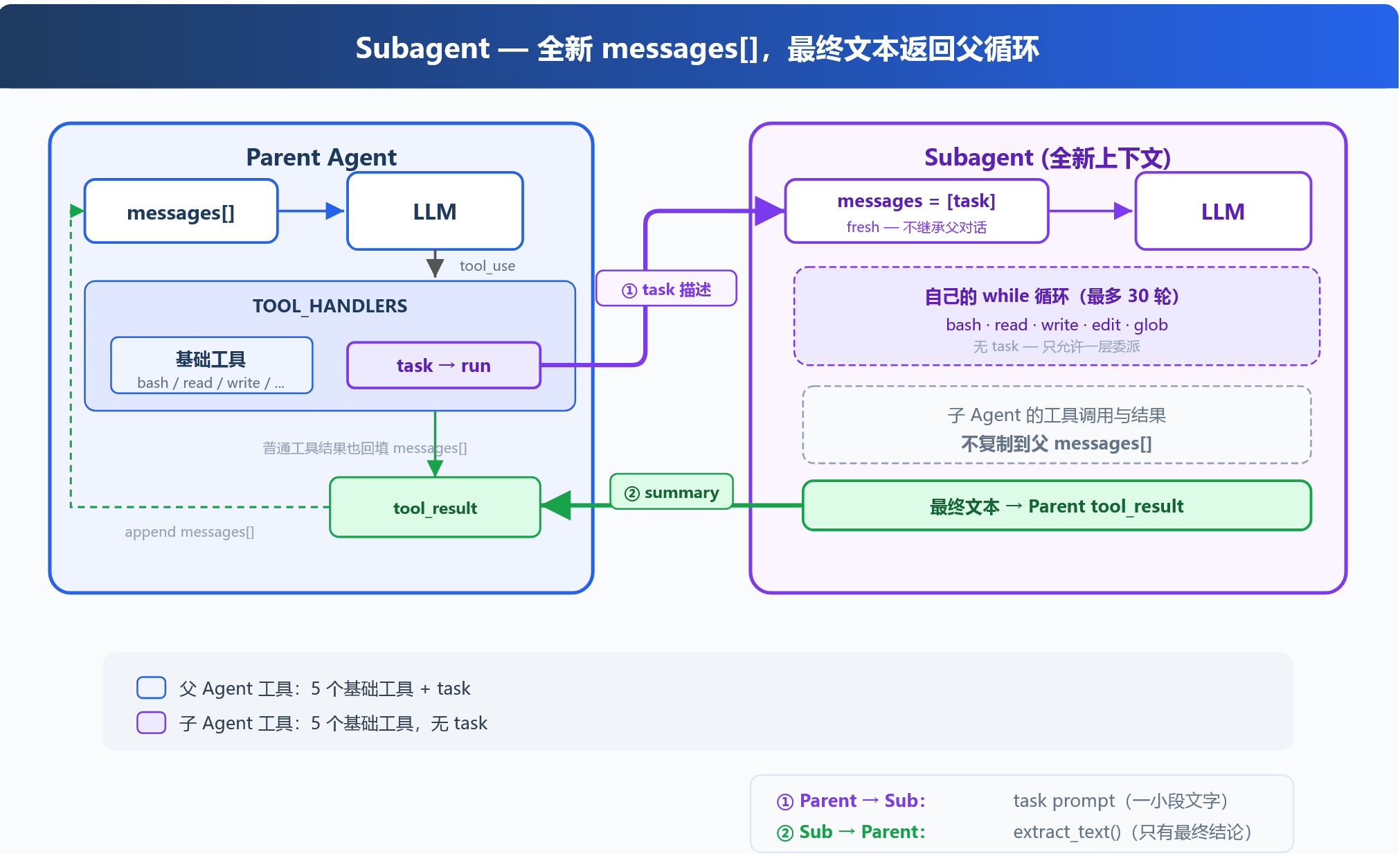
- The sub-agent gets a brand-new
messages[],fresh, with no inheritance from the parent conversation. - It runs its own
whileloop, at most 30 rounds, with a tool table of the basics — bash / read / write / edit / glob — and no task: only one level of delegation is allowed. - Its internal tool calls and results are not copied back into the parent’s
messages[]; only the final text goes back, through something likeextract_text(), as the parent Agent’stool_result.
Round-trip accounting: the parent Agent’s window gains only “a short task description” and “a conclusion.”
Extension points: Hook and the task system
Hooks are written outside the loop. If extension logic is shoved into the loop line by line, it soon becomes unrecognizable:
def agent_loop(messages): while True: # ... LLM call ... for block in response.content: if block.type != "tool_use": continue log_to_file(block) # add one line check_permission(block) # add one line notify_slack(block) # and another output = execute(block) auto_git_add(block) # one more # ... before long the loop is unrecognizableHence the HOOK table: UserPromptSubmit (context injection), PreToolUse (permissions, logging), PostToolUse (large-output handling), Stop… covering three kinds of needs — permissions on a tool (user consent, high-risk commands), printing the work log of a tool, and judging a tool’s output (is it a large file).
The key point: the execution order could stay the same anyway; the value of a Hook is not changing the order but decoupling the concrete extension logic from the Agent Loop, so extensions can be registered, added, and removed independently without touching the core loop.
Todo and Task are two different things. If todo_write tells the agent “what to do,” then task_system tells it how the tasks depend on each other.
Todo is a list: it gives the Agent planning ability, but not every task needs a todo. States are written [ ] pending, [>] in progress, [x] completed.
Task is a persisted file. For a job like “create the db → create the table → test,” the whole thing has sequential dependencies:
# Create task dependencies, wired up through blockedBy# One task per file, saved across sessions / restorable@dataclassclass Task: id: str subject: str description: str status: str # pending | in_progress | completed owner: str | None # the Agent responsible for the current task blockedBy: list[str] # list of task IDs it depends onThere are two rules: one task, one file (.task/<task_id>.json); and only when all the tasks in blockedBy (except the first) have status=complete can the next one start. The status moves from pending to in_progress to completed.
This also answers “if you quit CC, do the tasks still exist” — they do, because they are files on disk, not variables in memory.
Multi-agent: Agent Team
A subagent is like a tool — it finishes and it is done; an Agent_team, by contrast, has to hold persistent state (work, IDLE, shutdown). This part is the most “engineered” piece of the three implementations, and is worth noting item by item:
- Whether to use multiple agents is the user’s call. The lead proposes a plan; the user decides.
- Assignment runs through files, not contention. One task, one file (there is a
lead.jsontoo), withowner = agentinside, so a task can be assigned directly instead of being fought over. - Task assignment runs both ways. Early on the lead assigns agent_task; but after an agent finishes there are still tasks left over (in reality the number of tasks far exceeds the number of agents), plus the lead’s own review tasks, so idle agents go pick up new tasks (
new_task > lead_task). - Messages go through a persisted mailbox. Agents — and the lead with them — pass information through
.mailboxes/<agent>.json.
# Mailbox handles communication between agents, .mailboxes/# One .json file per agent, recording the messages sent to that agent# Agents have independent context / loop / tool / messagesclass MessageBus: def send(self, from_agent, to_agent, content, msg_type="message", metadata=None): msg = { "from": from_agent, "to": to_agent, "content": content, "type": msg_type, "metadata": metadata or {}, } ...- Feedback has to be cleared. When an agent finishes, it reports result / status back to the lead and calls
clear_lead; without clearing, the next round injects the old agent_team information all over again. - Parallelism needs isolated files. Agent_team executes in parallel; to keep agents from interfering with each other’s edits of the same content, a
worktreebranch is created under the directory (.git/worktree). - Only what is observable is executable. The Runtime exposes args to show whether an agent is really “doing” something, rather than merely having accepted the request.
- One agent, one thread. A thread is created, each agent gets a loop of its own, executing
(task, name).
Long-lived capabilities: memory, MCP, background tasks, scheduled tasks
memory
Memory has to solve four problems, each with a corresponding mechanism:
Storage — how is it persisted? One memory, one file, kept under .memory/ in categories (personal_prefer, project…), with fields name / description / type / content; plus a .memory/MEMORY.md recording a one-line summary of each memory, one per line, acting as an index.
Recall — how does it get into the conversation? Four progressive steps: first take the last few rounds of conversation as feedback; then use a small model to semantically match the user input against MEMORY.md to get an index; if matching fails, normalize the user input into keywords and match those against a memory’s name and description; finally, memory joins as background knowledge — the current request takes priority over historical memory; “taken into account first,” not overridden.
Extraction — how is it extracted from context? Have the LLM parse the user input into json to match against memory; only scope=persistent gets stored; the fallback is a temporary memory vocabulary check; missing fields likewise disqualify it from being stored.
Maintenance — how are memories optimized? When the number of memories reaches a threshold, reorganize the knowledge; when handling duplicate memories, compare fields like name, description, and body; snapshot the original file before changing anything, so a failed edit or delete can still be recovered (snapshot first, then change).
MCP
The chain has three layers: mcp server (where you get tools) → mcp client (executes tools with a handler) → harness.
- The tool_pool is dynamic. The first round has only the base tools; after connecting to an mcp server and getting the corresponding tools, the second round assembles them with
assemble_tool_pool(),Tool = base tool + mcp_client_tool. - Why name them
mcp__{server}__{tool}? Because different servers may have tools with the same name, and the server prefix keeps them from colliding. - Permissions need a choke point. If some mcp server offers inherently dangerous capabilities like
delete_databaseortrigger_deploy, the harness or the user has to make the final confirmation.
Background tasks
The idea in one sentence: after the Agent starts a time-consuming task, do not let it sit there waiting — throw the task into the background, let the Agent keep thinking and working, and tell it the result once the task is done.
- Currently only bash is opened up: the tool_call’s return carries
{"name": …, "run_in_background": …}, and only whentool_name == "bash"andrun_in_backgroundis true does it go to background execution — a judgement that depends on the LLM’s semantic understanding. - So one tool gets two tool_calls:
bash → bg_idon the main thread,bash → commandin the background. The background result is formatted into a<task_notification>, telling the LLM that this is a new, separate event. - Beyond locking (
threading.Lock), there is another detail: when a task completes it is not inserted into the agent loop right away but first put intoresult{}/_ready[], to be consumed by the next loop.
Cron scheduler
Scheduled tasks, such as having the agent push once a day. The mechanism is cruder than you would expect: update the time every second and compare it against the task time; when it is due, put the task into cron.queue and deliver it into the message once the agent is idle; a lock avoids thread contention. There is a first-fire flag: the first fire puts it into the queue, and later fires do not store it again.
# durable=True writes it to json, kept across sessions / saved on task restart@dataclassclass CronJob: id: str cron: str prompt: str recurring: bool durable: bool pending_delivery: bool = False last_fired: str | None = None# cron decides when to fire, prompt is the task handed to the Agent once it fires.# pending_delivery means the task is already due but has not been picked up by the model,# last_fired prevents the same minute from being enqueued twice.Security boundaries
A few security designs have come up in passing; here they are collected. CoreCoder’s /save is a good example: saving a session asks the user to type a session name, but on the command line that is just typing arbitrary characters — it defends against nothing.
The first line of defense is sanitization. Take just the trailing name, so it cannot jump to another directory:
Input: session_id = "../../etc/passwd"
Sanitize:  replace("\\", "/")   -> "../../etc/passwd"  split("/")[-1]       -> "passwd"  regex replace        -> "passwd"  strip("._")          -> "passwd"  return "passwd"
Join: /home/user/myapp/sessions/passwd.jsonCheck: parent directory is /home/user/myapp/sessions, passed
The second line of defense is validation. If sanitization is somehow bypassed, the parent directory is compared once more after resolve():
Join: Path("/home/user/myapp/sessions/../../../etc/passwd.json")Resolve: resolve() -> /etc/passwd.jsonCheck: path.parent is /etc, which does not equal root (/home/user/myapp/sessions)Result: immediately raise ValueError("Invalid session id") and block accessThese two, plus the Bash dangerous-command table and the final confirmation on dangerous MCP tools from earlier, follow one principle: do not count on the model to police itself — concentrate the danger at the boundary and make crossing it impossible at the code level.
Three takeaways from reading these
Put the three implementations together and roughly three judgements survive:
The loop itself is the simplest part; what is hard are the “unclean” moments inside it. Interrupts, errors, compression, concurrency — every one of them makes the history or the state illegal, and the pattern for handling them is surprisingly uniform: make the data legal again first, then talk about anything else. content: ["interrupt"], moving the split boundary of compression, giving each thread its own copy — they are all the same move.
Context is a resource, and compression is not an after-the-fact patch. It determines where to cut and what to keep when compressing. That is why “keep the structured content” comes before “turn it into a summary” — a summary is irreversible, trimming is reversible.
An Agent’s capability boundary is held up by external systems. Task files, mailboxes, worktrees, memory directories, cron queues — put together they look pretty crude, but they are exactly what determines whether an agent can span sessions, whether it can collaborate, and whether it can be observed. This layer outside the model is where the engineering really has to be written.